How to use these notes
Read the summary first
Get the big picture before the details.
Learn each idea in three parts
The theory, a practical example, and why it matters.
Run every example yourself
Copy the code into Python on your own computer and run it. Change a value and see what happens.
Test yourself at the end
Answer the quick recall questions before you open the answers.
Summary
This class uses Python as a tool to introduce the way programmers think and the habits that make code good. We learned that:
- Programming is not just writing code. It is solving a problem logically.
- Every piece of software starts with understanding the problem and goes all the way to testing and improving it.
- Functions, variables, conditionals and loops are the basic building blocks of programming.
- Exceptions and unit tests make code strong and reliable.
- Libraries, file input/output and regular expressions handle data efficiently.
- Object-oriented programming is a way to model real-world things in code.
Why this lesson matters
Software is now part of almost everything we do. To be a good programmer, knowing a language's syntax is not enough. You need to break a big problem into small, manageable parts and solve them with clear thinking and organised code.
| If you skip the basics… | What happens |
|---|---|
| Software that does not work | Code that gives wrong results frustrates users and costs the business. |
| Unsafe, unstable systems | Without error handling and testing, software can crash, lose data or open security holes. |
| Code nobody can maintain | Code written without planning and modules becomes impossible to understand and fix over time. This is called technical debt. |
| Wasted time and money | Without the right method, the same problems get solved again and again, so development takes longer and costs more. |
The goal: to give learners the thinking tools and skills to write code that is reliable, maintainable and ready for real-world problems.
From problem to software
Every software project goes through these stages:
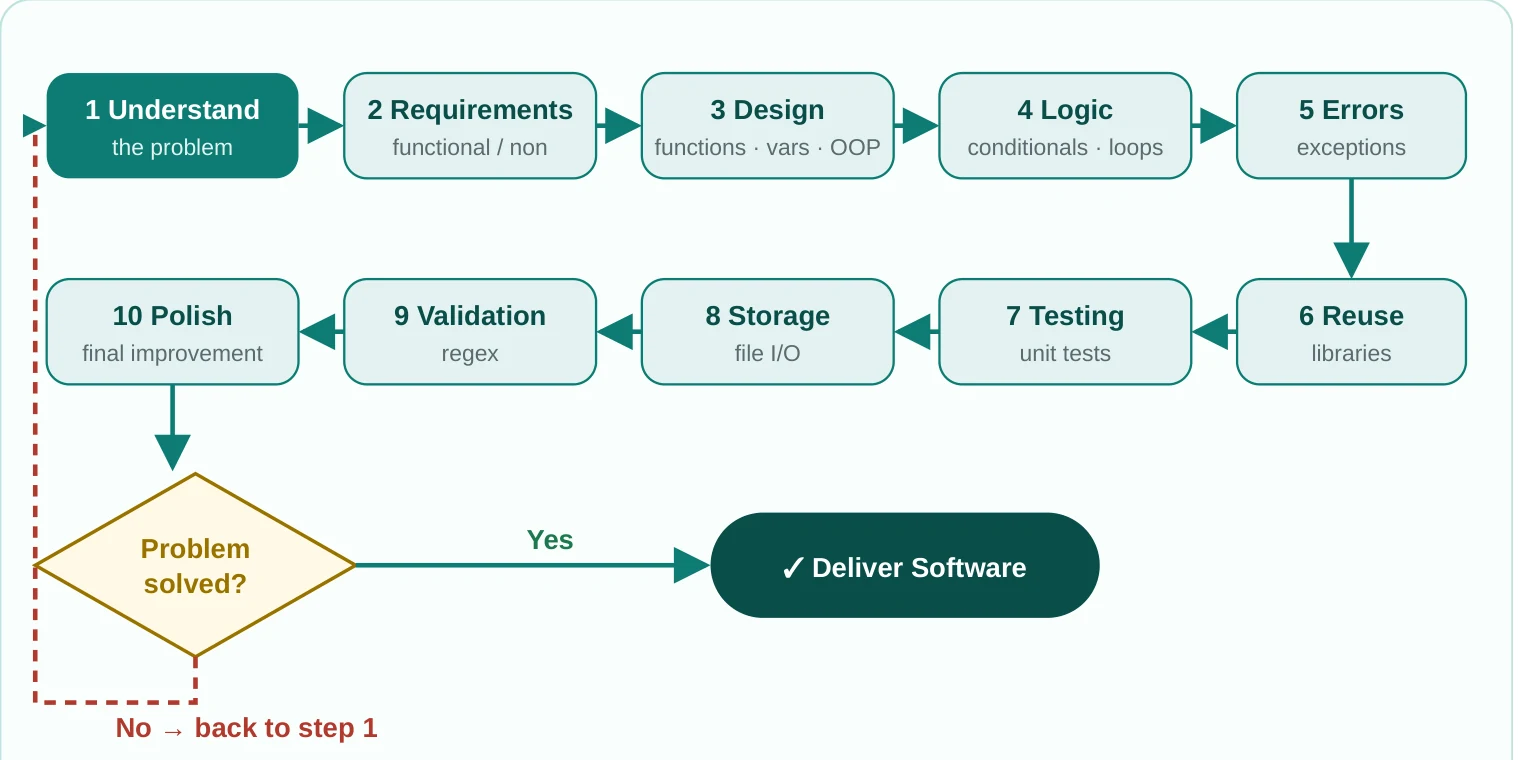
Questions to ask before you start
| Business and user questions | Technical questions |
|---|---|
| Who will use this software? | Which language and tools suit it best? |
| Which problem does it solve, or which need does it meet? | How will the data be stored and organised? |
| What are its main functions? | Do we need an outside library or framework? |
| How will users interact with it? | What could go wrong, including unusual cases, and how will we handle it? |
| How will we measure success? | How will the code stay fast as it grows? |
| What value does it create? | How will we test and verify the code? |
The building blocks
Functions, variables, conditionals and loops are the alphabet of a programming language. You cannot write a useful program without them.
Functions
Idea: a function is a block of code that does one specific job. Functions split a program into small, reusable parts, which makes code easier to understand and look after.
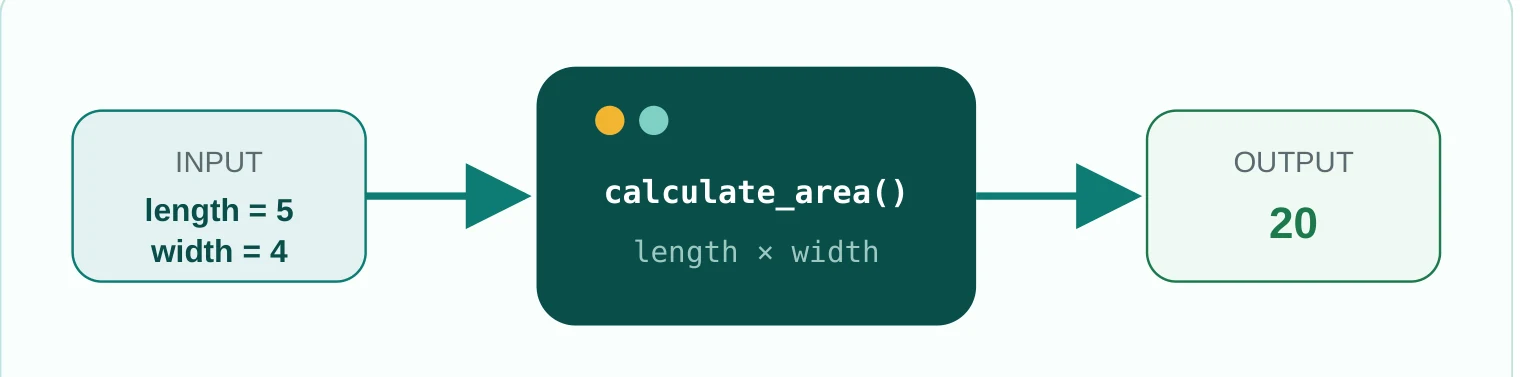
Python — functions
def calculate_area(length, width):
    return length * width

def greet(name):
    print(f"Hello, {name}!")

print(calculate_area(5, 4))   # 20
greet("Ali")                  # Hello, Ali!
Why it matters: functions stop you repeating code, split the program into parts and help teams work together, because each developer can work on their own part. They are the first step in solving a big problem in small pieces.
Variables
Idea: variables are named places in the computer's memory that hold data for a while. The name gives you easy access to the data.
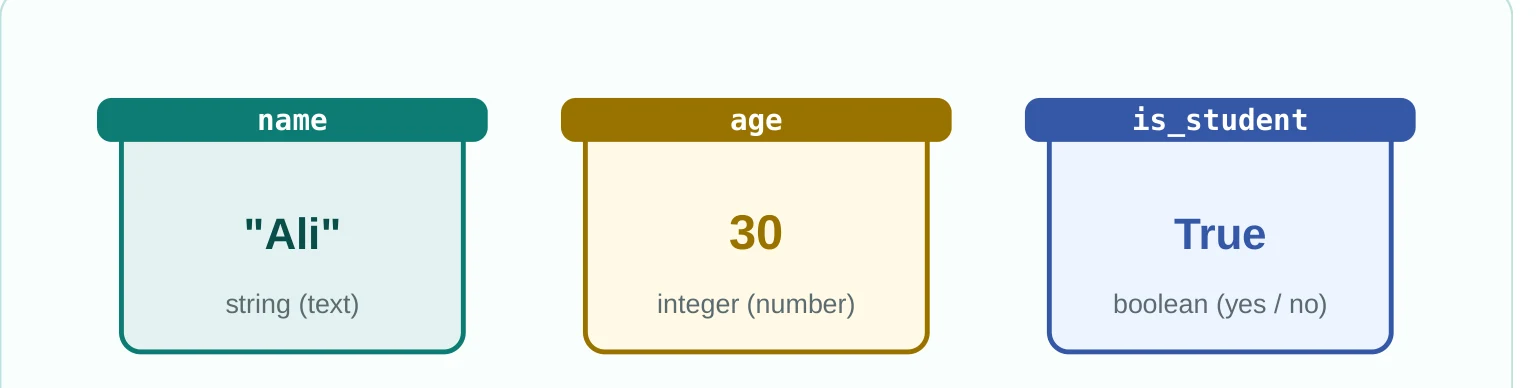
Python — variables
name = "Ali"          # a string variable
age = 30              # an integer variable
is_student = True     # a boolean variable
Why it matters: variables let a program change data while it runs, keep results and use information flexibly. Think of labelled jars in a kitchen: the jar says "sugar" and holds sugar. You pick it up by name, and you can change what is inside.
Conditionals (if / else)
Idea: conditionals let a program make decisions. A part of the code runs only if a condition is true or false.
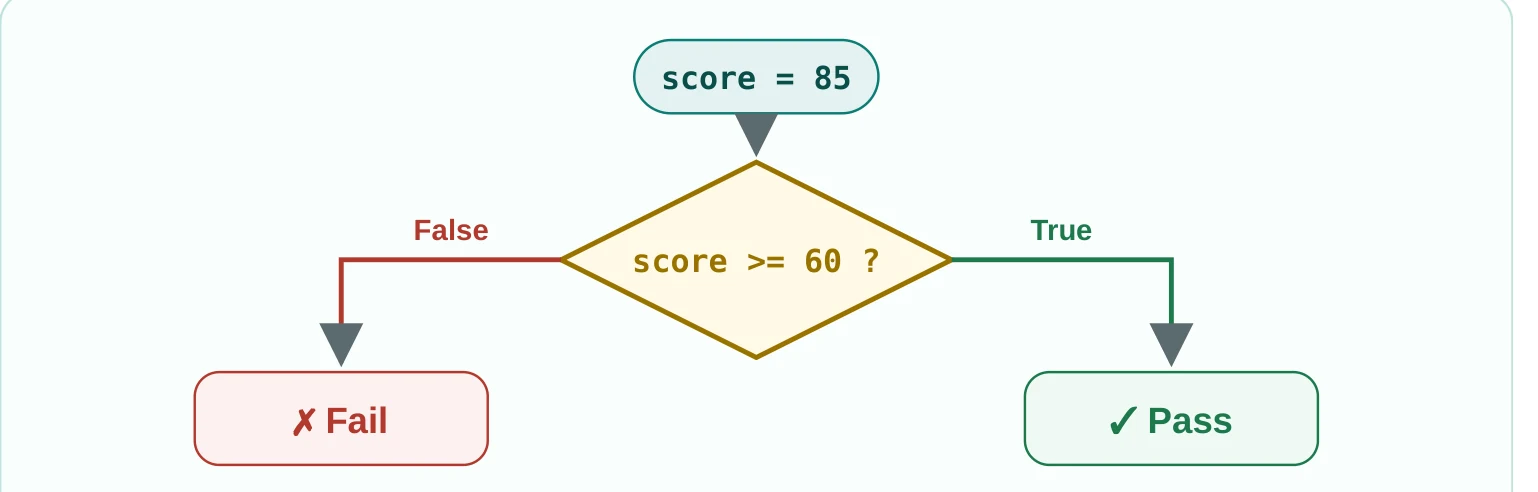
Python — if / else
score = 85
if score >= 60:
    print("Pass")
else:
    print("Fail")
Why it matters: without conditionals a program runs in a straight line and cannot react to real-world situations. They make programs respond to what is happening.
Loops (for / while)
Idea: loops run a block of code again and again, until a condition is met or every item in a collection is done.
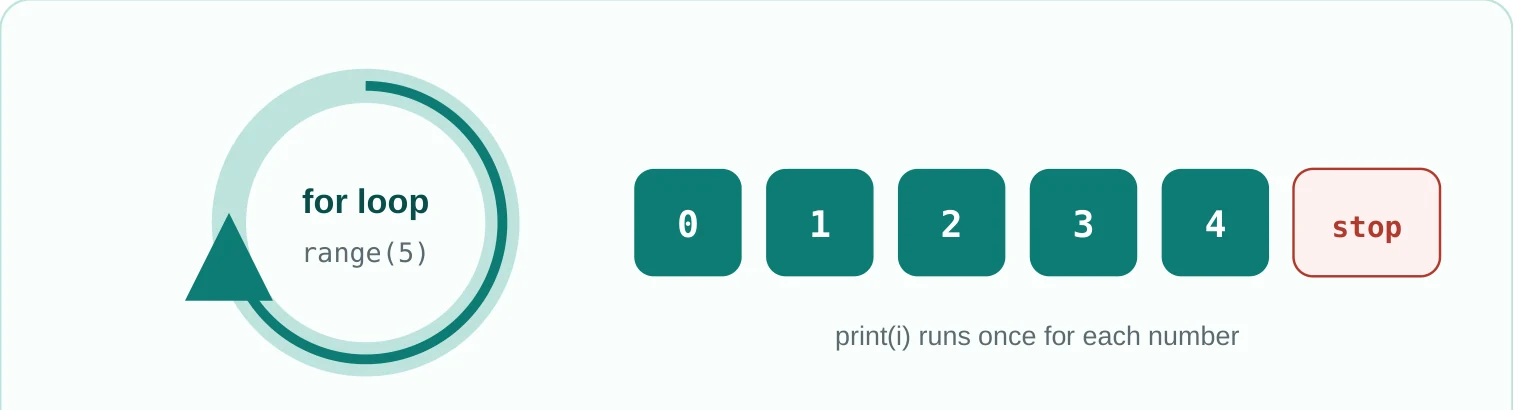
Python — for and while loops
# For loop: counts from 0 to 4
for i in range(5):
    print(i)

# While loop
count = 0
while count < 3:
    print("Hello")
    count += 1
Why it matters: loops automate repeated work, save time, shorten code and help process large amounts of data.
for loop when you know how many times to repeat. Use a while loop when repeating depends on a condition.Making code strong: exceptions and unit tests
Writing code is not enough. Code should be reliable and keep working even when things go wrong.
Exceptions
Idea: exceptions are a way to handle unexpected errors while a program runs. They stop the program crashing and deal with the problem gracefully.
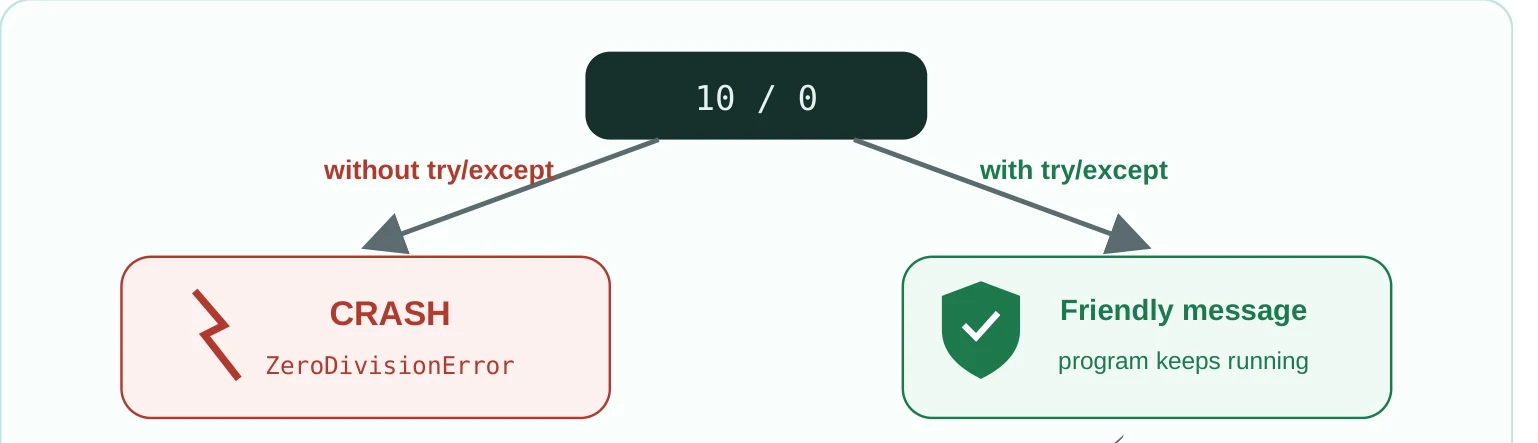
Example: dividing by zero, or trying to open a file that does not exist.
Python — try / except / finally
try:
    result = 10 / 0
except ZeroDivisionError:
    print("Cannot divide by zero!")
except Exception as e:
    print(f"An error occurred: {e}")
finally:
    print("This will always run")
Why it matters: this is defensive programming. It keeps software stable with unexpected input, and the user sees a simple message instead of a crash.
try part holds code that might fail, except catches the error, and finally always runs, error or not.Unit tests
Idea: unit tests check the smallest parts of the code, such as single functions or classes, to make sure each one works. They run automatically.
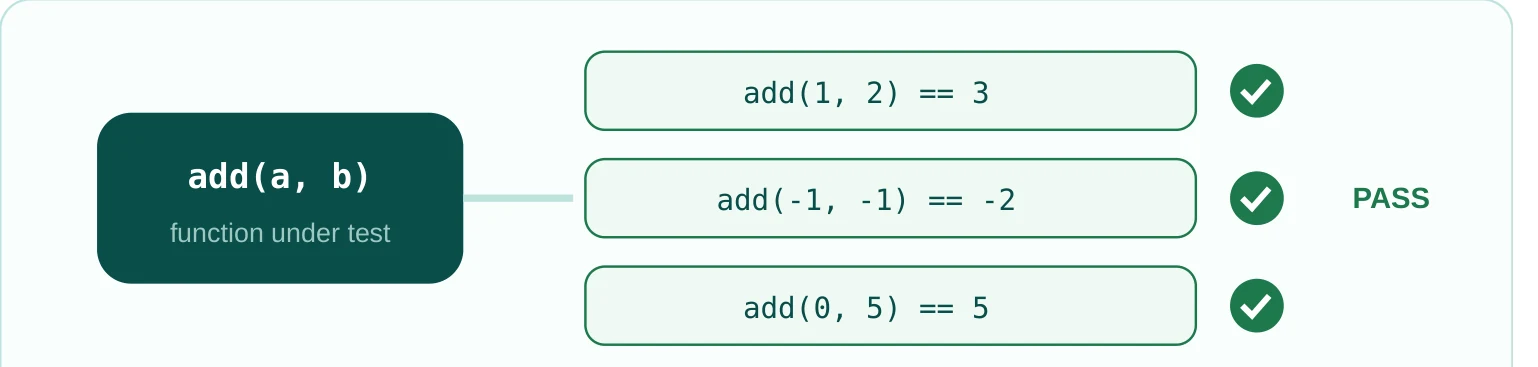
Example: for a function that adds two numbers, write tests that check the answer is right for positive numbers, negative numbers and zero.
- Find bugs early: mistakes are caught at the start of development.
- Stop old features breaking: after a change, tests show if you broke something that used to work.
- Document the code: good tests show what the code is meant to do.
- Improve safely: you can rewrite code with confidence because the tests confirm it still works.
Building in modules: libraries and files
Reusing code and handling data well are the foundation of modern programming.
Libraries
Idea: libraries are collections of ready-made code, written by others or by you, that you can use again in your projects.
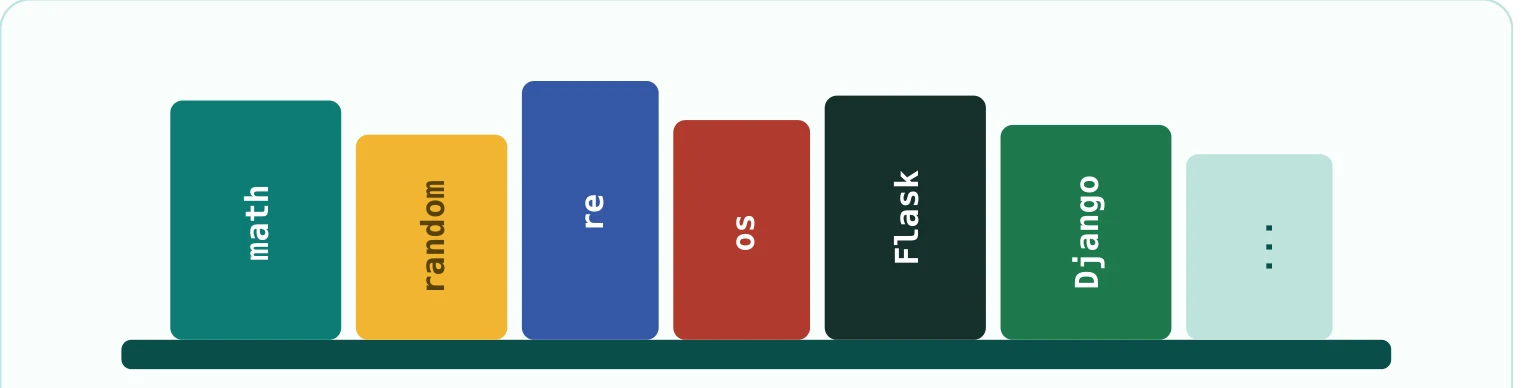
Example: math for maths such as sine and cosine, random for random numbers, and Django or Flask for web development.
Python — using libraries
import math
import random

print(math.sqrt(16))           # 4.0
print(random.randint(1, 6))    # a random dice number
Why it matters: do not reinvent the wheel. Libraries save time and effort, so you can focus on the problems that are unique to your project.
File input and output
Idea: file I/O means writing data to files on the disk and reading it back, instead of keeping it only in memory.
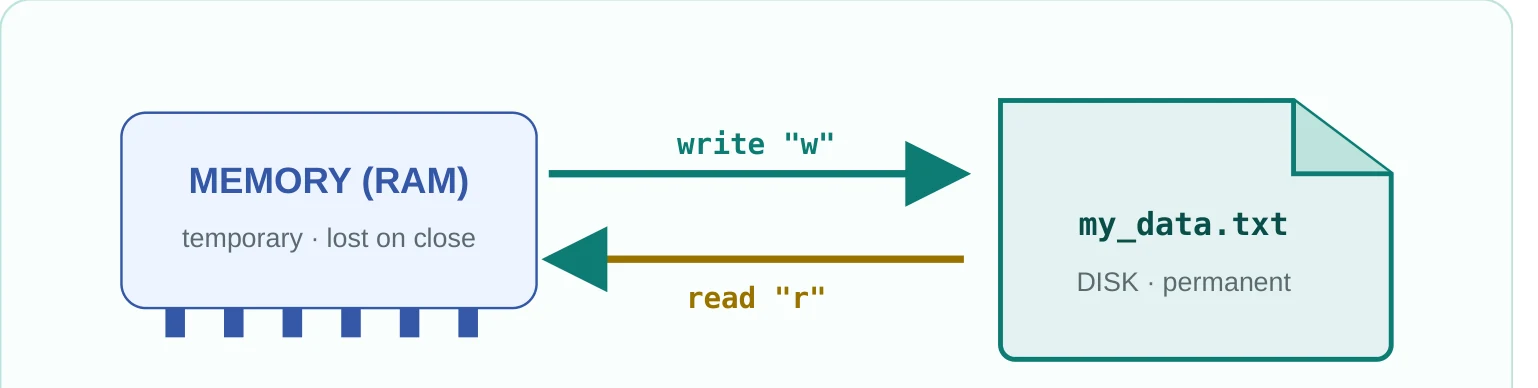
Python — write and read a file
# Writing to a file
with open("my_data.txt", "w") as file:
    file.write("Hello World!\n")
    file.write("This is my first I/O file.\n")

# Reading from a file
with open("my_data.txt", "r") as file:
    content = file.read()
    print(content)
Why it matters: it keeps data safe after the program closes. Databases, log files and settings files all depend on this.
Checking and extracting data: regular expressions
Idea: regular expressions, or regex, are a powerful language for describing patterns. They are used to find, match and change specific patterns in text.
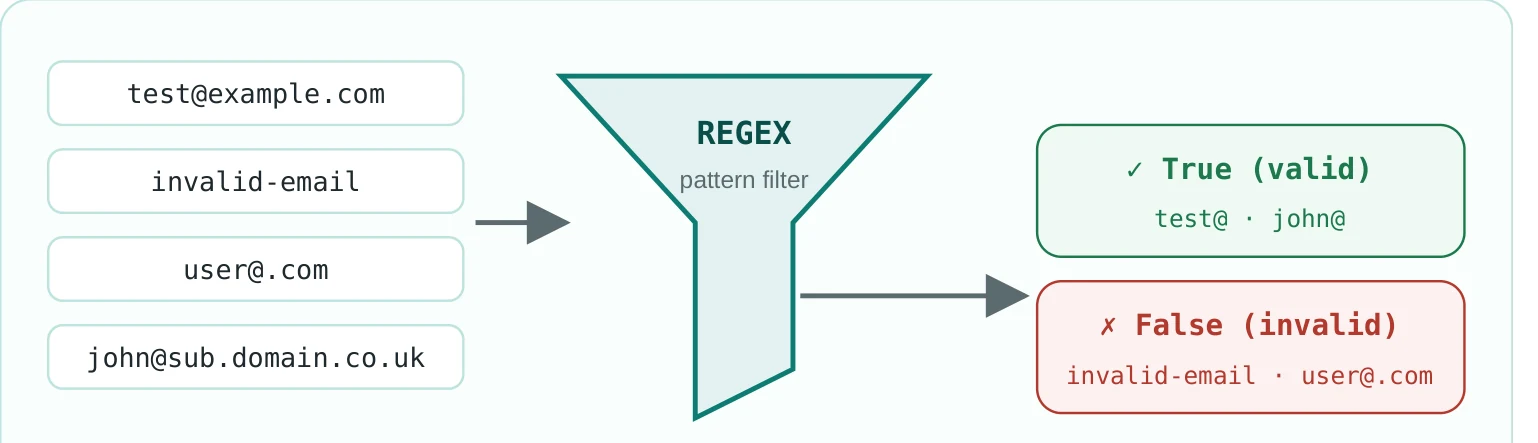
Example: checking an email address has the right shape, finding phone numbers, or pulling dates out of a large text file.
Why it matters: it makes sure what the user typed is what you expect, and it pulls information out of large data sets quickly.
Modelling the real world: object-oriented programming
There are different styles, or paradigms, for organising code. Object-oriented programming (OOP) models real-world things in code. Everything is built around objects, which hold both data and the functions that work on that data.
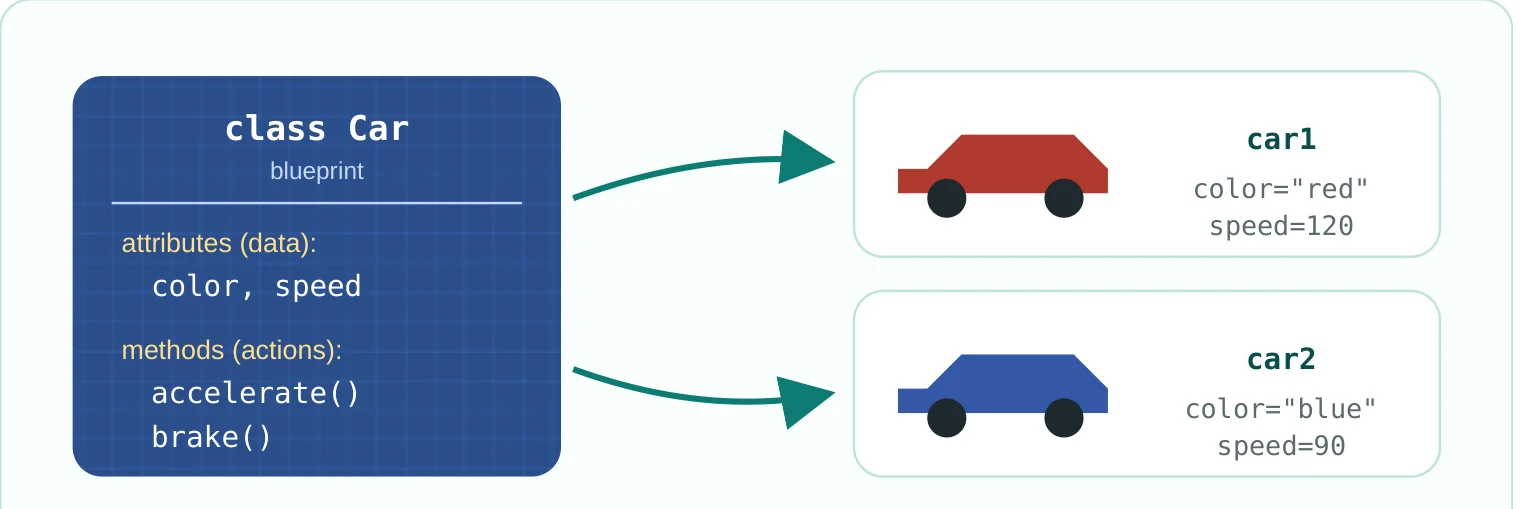
Python — a simple class
class Car:
    def __init__(self, color, speed):
        self.color = color      # attribute
        self.speed = speed      # attribute

    def accelerate(self):       # method
        self.speed += 10

    def brake(self):            # method
        self.speed = 0

car1 = Car("red", 120)
car1.accelerate()
print(car1.speed)   # 130
Real example: an online shop can have objects such as Product, Order and Customer.
Why it matters: OOP organises big, complex systems. It makes code reusable, easier to maintain and flexible, and lets programmers think about problems in a natural way.
Other paradigms
- Procedural programming: code is a sequence of functions run from top to bottom, like following a recipe.
- Functional programming: the program is built from mathematical-style functions that avoid changing data, like equations.
Different paradigms suit different problems. Knowing them helps you pick the right one for each project.
Comparisons
| Style | In simple words | Example | Pros and limits |
|---|---|---|---|
| Procedural | A straight list of steps, split into small functions. Focus: what to do. | A recipe: take flour, add water, knead. | Pro: simple for small projects. Limit: harder to reuse in big systems; shared state can cause bugs. |
| Object-oriented | Models real things. Each object has its own data and actions. Focus: who does what. | A car with a colour and speed that can drive and stop. | Pro: great for big systems, reuse and maintenance. Limit: harder for beginners; needs more planning. |
| Functional | Built on functions that avoid changing state and just turn input into output. | A function that doubles a number: same input, same output. | Pro: predictable and easy to test. Limit: can feel hard where a lot of state is needed. |
The three styles at a glance
Procedural :  step1() -> step2() -> step3()        # what to do
OOP        :  car.accelerate()                    # who does what
Functional : f(x) = x * 2 -> f(3) is always 6 # same input, same output| Conditionals | Loops | |
|---|---|---|
| Job | Decide which path to take | Do the same job again and again |
| Question | "Is this condition true?" | "How many times, or until when?" |
| Use when | You need different results in different situations | You want to automate repeated work |
| Example | Pass if the score is 60 or more, otherwise fail | Print the numbers 0 to 4 |
| Variable | File | |
|---|---|---|
| Lives in | The computer's memory | The disk |
| Lasts | Gone when the program closes | Stays after the program closes |
| Used for | Working things out while the program runs | Databases, logs and settings |
Two code templates to practise with
A unit test template
Purpose: a basic structure for checking that functions give the right answer for different inputs.
Python — unittest
import unittest

# The functions to be tested
def add(a, b):
    """Adds two numbers."""
    return a + b

def subtract(a, b):
    """Subtracts two numbers."""
    return a - b

# Test cases
class TestMathFunctions(unittest.TestCase):

    def test_add_positive_numbers(self):
        self.assertEqual(add(1, 2), 3)
        self.assertEqual(add(10, 20), 30)

    def test_add_negative_numbers(self):
        self.assertEqual(add(-1, -1), -2)
        self.assertEqual(add(-5, 3), -2)

    def test_add_zero(self):
        self.assertEqual(add(0, 5), 5)
        self.assertEqual(add(0, 0), 0)

    def test_subtract_positive_numbers(self):
        self.assertEqual(subtract(5, 3), 2)
        self.assertEqual(subtract(10, 5), 5)

    def test_subtract_negative_numbers(self):
        self.assertEqual(subtract(-5, -3), -2)
        self.assertEqual(subtract(3, 5), -2)

# Run the tests
if __name__ == "__main__":
    unittest.main()
What you should see: the test framework runs every test. If they all pass, you get a success message. If one fails, it tells you which test failed and why, so you can fix the code.
Checking an email address with regex
Purpose: use a regular expression to check that an email address typed by a user has the right shape.
Python — re
import re

# A common pattern: username, '@', domain name,
# and a top-level domain (like .com)
email_pattern = r"^[a-zA-Z0-9._%+-]+@[a-zA-Z0-9.-]+\.[a-zA-Z]{2,}$"

def validate_email(email_address):
    """Validates the given email address using a regular expression."""
    if re.match(email_pattern, email_address):
        return True
    return False

test_emails = [
    "test@example.com",
    "john.doe123@sub.domain.co.uk",
    "invalid-email",
    "user@.com",
    "another@example",
    "user@localhost",
]

print("Email validation results:")
print("-" * 20)
for email in test_emails:
    print(f"'{email}' is valid: {validate_email(email)}")
What you should see: each address is checked against the pattern and shows True or False. Read the pattern like this: a user name, then @, then a domain name, then a dot, then at least two letters such as com. That is why another@example fails: it has no final dot part.
Step-by-step checklist
Use this to apply the ideas and check your own code. It shows the whole process of building a small program.
- Define and analyse the problem: Do I clearly understand what my program must solve? Have I broken it into small parts? Do I know the result I want?
- Structure and design: Have I picked the functions I need? Do my variables have clear names and the right data type? Should I use classes and objects?
- Core logic: Are my conditionals correct? Are my loops efficient, and can they end?
- Error handling: Have I found what could go wrong, such as bad input or a missing file? Do I use try/except? Does the user get a clear message?
- Reuse: Have I used a suitable library instead of rewriting it? Are imported libraries used correctly?
- Saving data: If data must survive after closing, have I used file I/O? Do I close files properly, or use
with? - Validation: Have I checked user input with regex or another method? Does the program handle unexpected data?
- Testing: Does every important function have unit tests? Do they cover correct, wrong and out-of-range cases? Do they all pass?
- Review: Is the code clean and commented? Have I removed repeated code? Is it fast enough, if that matters?
Important warnings
while loop, make sure the condition will become false at some point, or the program will be stuck forever.Common beginner mistakes
| Mistake | What it looks like | Do this instead |
|---|---|---|
| Bad variable names | Short, unclear names such as x, data, temp | Names that explain the purpose: user_name, is_active_user, total_price |
| Logic errors in conditions | Wrong order or operator, such as = instead of == | Think through every case and test simple cases first |
| Infinite loops | A while condition that never becomes false | Make sure something inside the loop changes the controlling variable |
| Not handling exceptions | No try-except for division by zero, missing files or bad input | Find the risky places, handle them and tell the user what went wrong |
| Reinventing the wheel | Writing functions that already exist in standard libraries | Check Python's standard library first; it saves time and has fewer bugs |
| No tests | Code without unit tests, so bugs appear unexpectedly | Write tests with your code, or even first (test-driven development) |
| Not closing files | Forgetting close() after open() | Use with open(...) as file:, which closes the file for you |
| Unclear code | Few or unhelpful comments | Write code that explains itself; comment why, not just what; add docstrings |
Glossary
| Term | Simple meaning |
|---|---|
| Programming | Giving a computer instructions to do a job. |
| Python | A popular, high-level, general-purpose language that is easy to read. |
| Function | A named block of code that does one job and can be used again and again. |
| Variable | A named place in memory that holds data for a while. |
| Conditional | The part of a program that makes logical decisions. |
| Loop | A block of code that repeats until a condition is met. |
| Exception | An unexpected error or unusual situation while a program runs. |
| Library | A collection of ready-made code that can be reused. |
| Unit test | A check that the smallest part of a program works correctly. |
| File I/O | Reading data from files on the disk and writing data to them. |
| Regular expression (regex) | A powerful language for finding and matching patterns in text. |
| Object-oriented programming (OOP) | A style that models real-world things as objects in code. |
| Procedural programming | A style where the program is a sequence of functions. |
| Functional programming | A style based on mathematical functions that avoid changing state. |
| Debugging | Finding and fixing mistakes in software. |
| Paradigm | A basic style or philosophy for organising code. |
| Syntax | The rules for writing code in a language. |
| Algorithm | A clear, step-by-step set of instructions to solve a problem. |
| Defensive programming | Writing code that stays stable with unexpected input and situations. |
| Technical debt | The cost you pay later for rushed, unplanned code. |
Practice project: a personal task manager
This homework puts the ideas into practice. Build a simple task manager that runs in the command line. Users can add tasks, see them and mark them as done, and the tasks are saved in a file so they are still there next time.
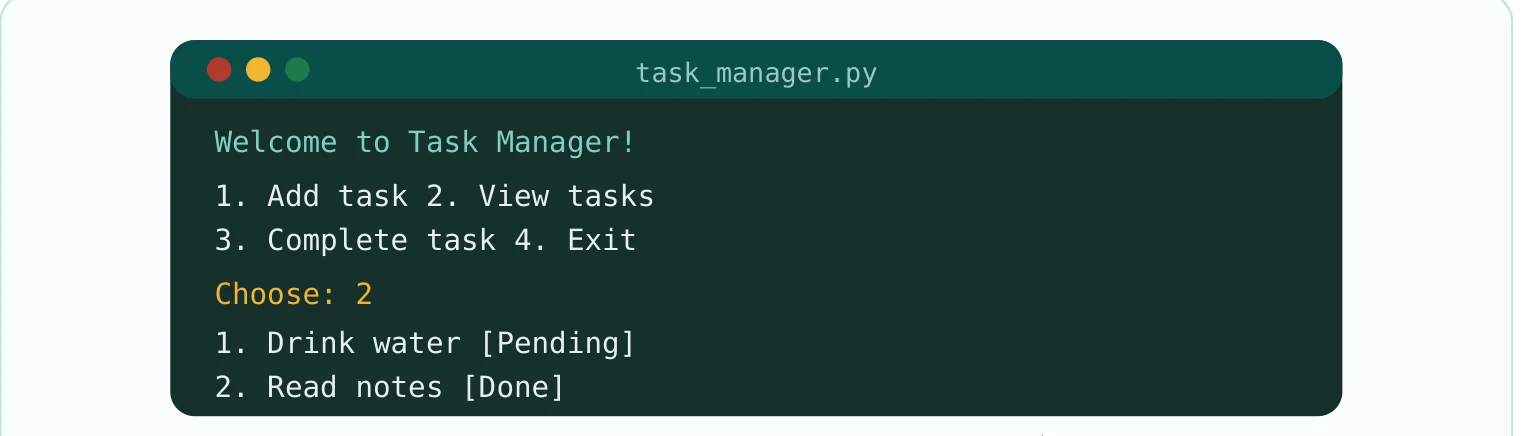
Main structure
Write a main function that runs the program and shows a welcome message.
Add a task
Write add_task(task_description). Each task has a description and a status, such as "Pending" or "Done". Ask the user to type the description.
View tasks
Write view_tasks() to list every task with a number and its status, for example 1. Drink water [Pending]. If there are no tasks, show "No tasks found".
Complete a task
Write complete_task(task_number) to mark a task as done. Use conditionals to check the number is valid, and show a clear error if it is not.
Save and load
Write save_tasks() and load_tasks() to store tasks in tasks.txt. Load old tasks when the program starts and save before it closes. Use try-except for file errors.
Menu and loop
Show the menu inside a while loop: 1. Add task, 2. View tasks, 3. Complete task, 4. Exit. Run the matching function, and handle wrong input such as letters instead of numbers.
Regex (optional)
For an extra challenge, use regex to check a pattern in the task, such as a date in the form YYYY-MM-DD.
Unit tests
Write at least three unit tests for each main function (add_task, view_tasks, complete_task) with the unittest module.
The result: a menu where users type a number to add, view and complete tasks, then exit. When they run it again, their tasks load automatically.
The final formula
Clear understanding of the problem + logical splitting (functions and variables) + decisions and repetition (conditionals and loops) + good error handling (exceptions) + reuse (libraries) + constant checking (unit tests) + lasting data (file I/O) + correct input (regex) + modelling the real world (OOP) = strong, reliable, efficient software.
Quick recall: test yourself
Think of your own answer first, then open the question to check.
What are functions and variables for?+
What can go wrong without exception handling? Give two examples.+
What is the difference between conditionals and loops?+
How do libraries help you avoid "reinventing the wheel"?+
What is the main idea of a unit test, and how does it make code reliable?+
Why do we need file input/output when we have variables?+
Give two uses of regular expressions.+
What is the main difference between object-oriented and procedural programming?+
How would you make your code defensive? Name two ways besides exception handling.+
What does "programming is not just writing code" mean?+
What is the main goal of this course, and who is it for?+
Name at least five main stages of the problem-to-software flow.+
Get new guides by email
Simple, practical guides on websites, AI tools and Python, explained in plain English. About two emails a month. Unsubscribe any time.

Founder, Rizwan's AI Agency. Currently learning Python and sharing his class notes, part by part, for other beginners.
Learning to code too?
More parts are coming over the next few weeks. Read the other guides for students, or ask a question on WhatsApp.