Quick answer
Free tools for mockups (images)
The pictures in this guide are simplified drawings of the real screens. Colours and layout may look a little different, but the button names are the same.
Shots.so
A browser tool that puts a screenshot inside a device frame, such as an iPhone, MacBook, iPad or a browser window, with clean backgrounds and shadows. You can start without an account, and free image exports come without a watermark. Paid plans add higher resolutions and longer videos.
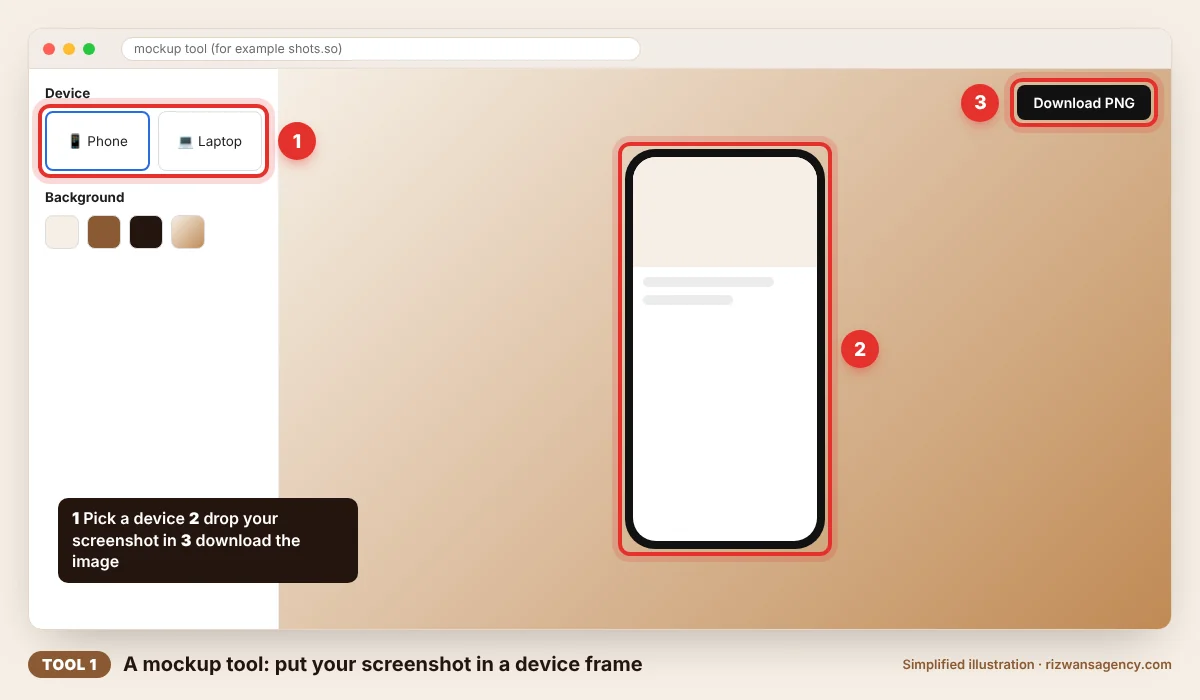
Canva
Good when you want the mockup inside a finished post or flyer. Canva has phone and laptop mockup templates and a Mockups app. Many are free; items marked with a crown need a paid plan. Use the free filter to stay on the free side.
Your browser's device mode
For sharp phone-size screenshots of your own website, open it in Chrome, press Ctrl+Shift+I (or Cmd+Option+I on a Mac), turn on the device toolbar, choose a phone such as an iPhone or Pixel and use "Capture screenshot" or "Capture full size screenshot" from the menu. No extra software needed.
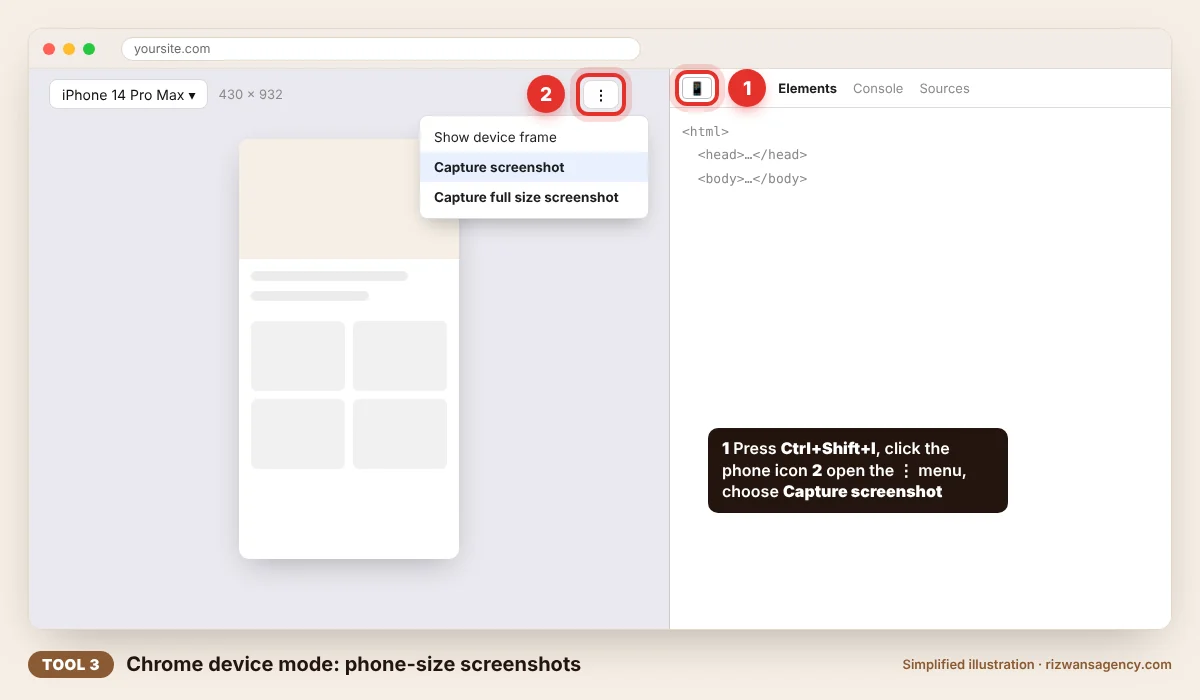
Sources: Shots.so overview, Bitdoze; Chrome DevTools device mode. Free plans change, so check each tool before you rely on it.
Free tools for product videos
| Tool | Best for | Good to know |
|---|---|---|
| OBS Studio | Recording your screen while you click through a website or app | Free and open source, for Windows, Mac and Linux, no watermark |
| Clipchamp | Simple editing on a laptop: trim, captions, text, music | Free plan exports at 1080p without a watermark; premium stock blocks export, so use the free filter |
| CapCut | Quick reels on a phone with captions and effects | Many effects, fonts and templates are Pro-only and must be removed before a free export; limits changed in 2026 |
| Canva | Turning mockups and photos into a short animated post | Free templates and animations; crown items need a paid plan |
Sources: OBS Studio; Clipchamp free plan, Fluxnote; CapCut free plan, Fluxnote.
Sizes to use
| Where it goes | Size (pixels) | Shape |
|---|---|---|
| Instagram or Facebook post | 1080 × 1350 | Portrait 4:5 |
| Reels, TikTok, WhatsApp Status, Stories | 1080 × 1920 | Tall 9:16 |
| Square post or product photo | 1080 × 1080 | Square 1:1 |
| Link preview on WhatsApp, Facebook, LinkedIn | 1200 × 630 | Wide |
| Website banner or YouTube | 1920 × 1080 | Wide 16:9 |
A 20-minute workflow
Clean up the screen (3 minutes)
Use real but tidy content: sample products, a demo customer name, no personal phone numbers. Close extra tabs and hide bookmarks for laptop shots.
Take two screenshots (3 minutes)
One laptop-width view of your home page and one phone view using device mode. These two images cover most posts.
Make the mockups (5 minutes)
Put the laptop screenshot in a MacBook frame and the phone screenshot in a phone frame in Shots.so or Canva. Use your brand colour or a soft gradient as the background.
Record a 15-second walk-through (4 minutes)
In OBS Studio, record yourself scrolling the home page, opening one product and tapping the WhatsApp or order button. Move slowly; you can speed it up later.
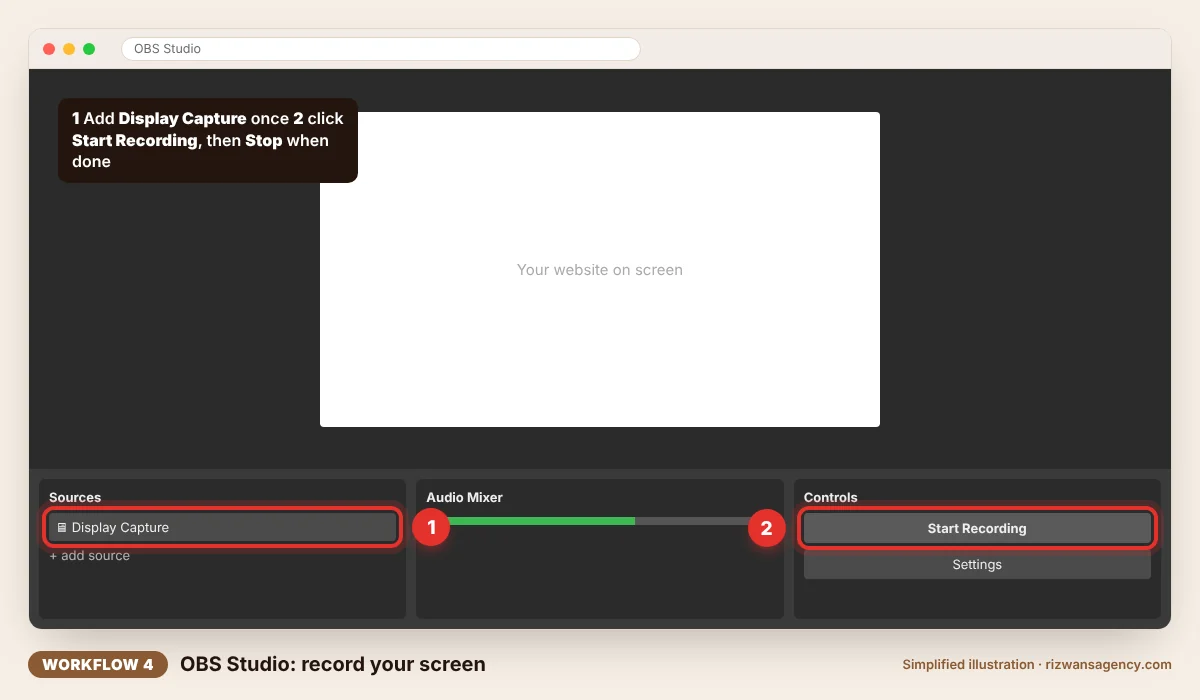
Edit and export (5 minutes)
In Clipchamp or CapCut: trim to 15 to 30 seconds, add a mockup image as the first frame, add captions in English and Urdu, and finish with one line such as "Order on WhatsApp". Export at 1080×1920.
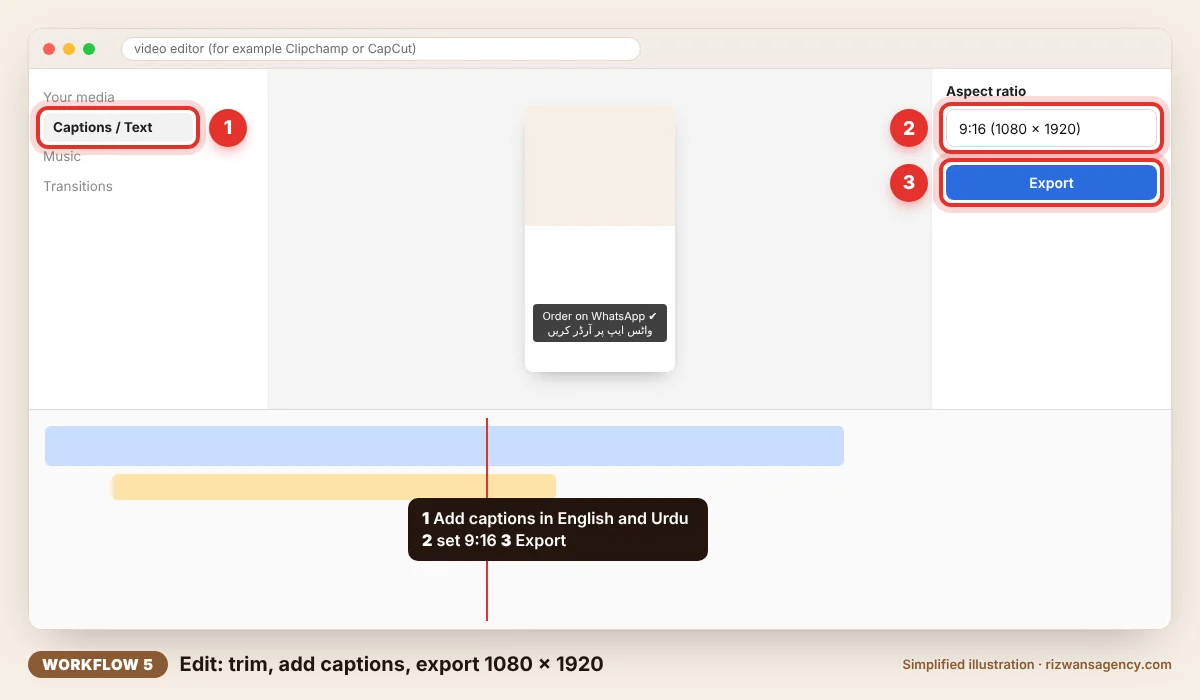
Tips that make it look professional
- One message per post. Show one feature or one product, not the whole site.
- Captions on. Most people watch reels with the sound off, so put the key words on screen.
- Same colours every time. Reuse your brand colour and font so posts look like they belong together.
- Real screens only. Never show features you do not have yet or fake reviews; it damages trust quickly.
- Export a test first. Check for watermarks, blurry text and cut-off captions on your own phone before posting.
Questions
Do free mockup tools add a watermark?+
Can I use these mockups for my business ads?+
Is it safe to upload screenshots to online tools?+
Do I need a powerful computer?+
Founder, Rizwan's AI Agency. Plans and builds websites, apps and AI tools for small businesses in the UK, UAE and Pakistan.
Rather have it done for you?
We make short AI product videos and mockups from your photos and website, with English and Urdu captions, ready for Instagram, TikTok and WhatsApp.